Microsoft Open Sources Magentic-UI for Human-Guided Web Automation
Microsoft has open-sourced Magentic-UI, a browser-focused AI agent designed to perform web-based tasks while keeping humans actively involved in planning, execution, and decision-making.
Built on Microsoft’s previously open-sourced Magentic-One project, Magentic-UI combines automated browser control with human-computer collaboration. Instead of treating human intervention as a fallback, the system integrates users directly into the agent workflow.
This approach allows users to review plans, modify individual steps, monitor browser actions, provide natural-language feedback, and take control of the browser when necessary.
According to the reported GAIA benchmark results, Magentic-UI achieved a 30.3% task completion rate in autonomous mode. When simulated users were allowed to provide additional information and assistance, the completion rate increased to 51.9%, representing a 71% relative improvement.
The system requested assistance in only about 10% of tasks, with an average of 1.1 assistance requests per task.

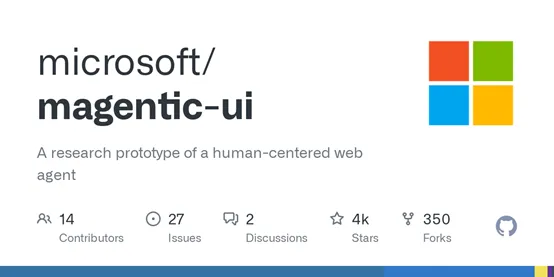
The project is available as open source on Microsoft’s GitHub repository:
Microsoft Magentic-UI on GitHub
🤝 Magentic-UI Puts Humans in the Loop #
A defining characteristic of Magentic-UI is its human-centric design.
Many browser agents are designed primarily around autonomous execution: the system receives an objective, determines a sequence of actions, and attempts to complete the task without further user involvement.
That model can be efficient, but it can also make it difficult for users to understand why an agent performed a particular action or intervene when its interpretation of a task is incorrect.
Magentic-UI takes a different approach by treating the user as an active participant throughout the workflow.
Users can influence the agent during both planning and execution, allowing the system to combine automated reasoning with human knowledge and judgment.
Collaborative Planning #
Before executing a task, Magentic-UI generates a preliminary step-by-step plan based on the user’s request.
The plan can include:
- Webpages the agent needs to visit.
- Browser actions it needs to perform.
- Information it needs to retrieve.
- Tools required to complete the task.
- The sequence in which individual operations should occur.
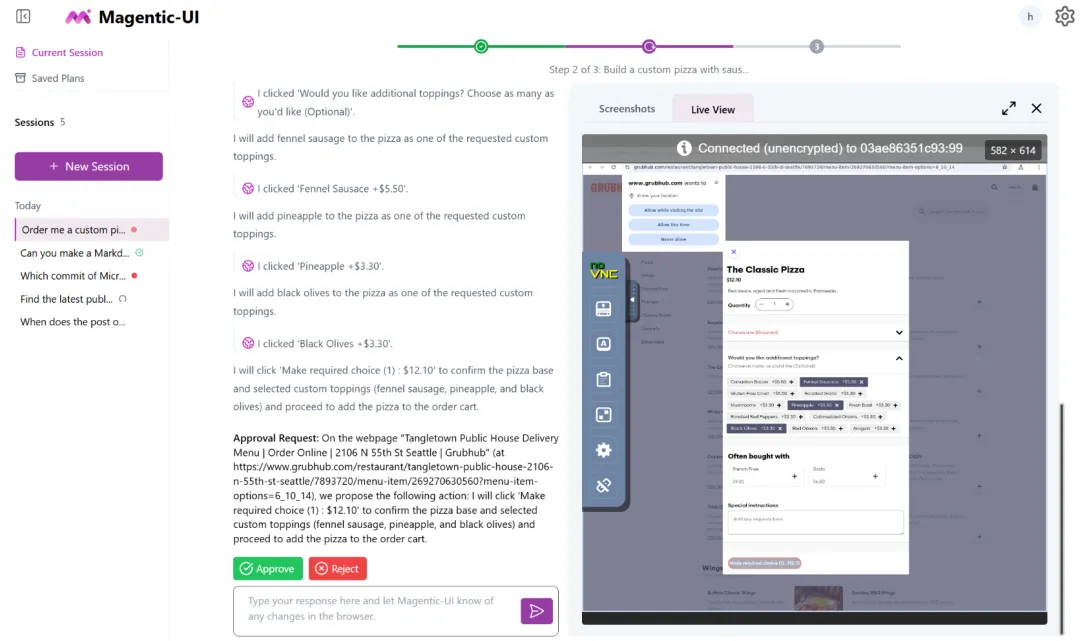
Instead of immediately executing this plan, Magentic-UI gives the user an opportunity to review and modify it.
Through its plan editor, users can add, remove, reorder, or rewrite individual steps. They can also provide natural-language feedback to change how the agent intends to approach the task.
This allows domain-specific knowledge and user preferences to become part of the execution strategy before the browser agent begins operating.
Collaborative Execution #
Human involvement continues after the plan has been approved.
Magentic-UI provides users with real-time information about the actions it is preparing to perform, including operations such as clicking buttons, entering text, and navigating to webpages.
The agent also reports information it observes during browser execution, giving users visibility into what it sees and how the task is progressing.
Users can pause the process whenever necessary and provide additional instructions through natural language.
If the agent reaches a step that requires human judgment or manual intervention, the user can take direct control of the browser, perform the necessary operation, and then return control to the agent.
This creates a hybrid workflow in which automated execution and manual control can be combined within the same task.
Action Protection #
Magentic-UI also includes an action protection mechanism for potentially irreversible operations.
Before performing certain actions that could have significant side effects, the system can request user approval. Examples include:
- Closing browser tabs.
- Clicking buttons that trigger external actions.
- Submitting forms.
- Performing other potentially irreversible browser operations.
This gives users an opportunity to review sensitive actions before they are executed.
Magentic-UI also uses sandboxing to isolate its browser and code-execution environments, adding another layer of separation between the agent and the surrounding system.
🧩 Magentic-UI Framework Overview #
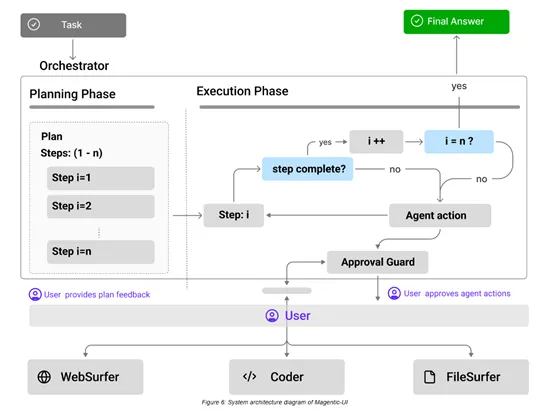
Magentic-UI starts with a user-provided automation request.
The request can consist of a simple text instruction or a more complex task accompanied by images or other contextual information.
At the center of the system is a coordinator that uses an underlying large language model to interpret the request and generate an initial task plan.
The resulting plan describes the operations required to complete the task, including webpages to visit, browser interactions, and other tools that may be needed.
The workflow can be summarized as:
- Task input — The user provides a web automation request.
- Planning — Magentic-UI generates an initial sequence of actions.
- Human review — The user examines and modifies the proposed plan.
- Execution — The agent performs the approved browser operations.
- Monitoring — The system reports upcoming actions and observed webpage information.
- Intervention — The user can pause, provide instructions, or take over the browser.
- Learning — Completed workflows can be stored as reusable plans.
Plan Editing Before Execution #
The collaborative planning stage is an important part of the architecture.
Rather than requiring users to describe every browser action manually, Magentic-UI generates a structured plan that users can refine.
For example, a user could remove an unnecessary step, insert an additional verification step, change the order of operations, or replace an automated action with a manual one.
Once the plan has been reviewed, it can proceed to execution.
This design attempts to combine the speed of automated planning with the contextual knowledge of the person operating the agent.
Transparent Browser Operations #
During execution, Magentic-UI exposes the actions it intends to perform instead of treating the browser as an opaque process.
Users can see operations such as:
- Which webpage the agent intends to visit.
- Which button it plans to click.
- What information it intends to enter.
- What information it has observed.
- What operation it plans to perform next.
Users can interrupt the workflow at any point.
If an agent encounters unexpected webpage content or reaches a decision that requires additional context, the user can provide instructions without necessarily restarting the entire task.
This makes the system better suited to workflows where some operations can be automated while others require human judgment.
🔮 Reusable Plans and Self-Planned Learning #
Magentic-UI also includes a mechanism for retaining successful task plans.
After a task is completed, the system can use the execution process and user feedback to save a step-by-step plan into a reusable plan library.
When users later submit a similar request, Magentic-UI can retrieve a relevant plan rather than generating an entirely new workflow from scratch.
This can reduce repeated planning work and potentially improve execution efficiency for recurring browser tasks.
Users can also inspect and modify saved plans, allowing previously created workflows to evolve as requirements change.
🔐 From Autonomous Agents to Collaborative Automation #
Magentic-UI represents a different approach to browser-based AI agents.
Instead of maximizing autonomy at every stage, the system combines automated planning and execution with explicit human oversight.
Its workflow gives users control over several important points:
- Planning: Review and modify the proposed task sequence.
- Execution: Monitor the agent’s browser actions in real time.
- Intervention: Pause the agent and provide additional instructions.
- Manual control: Take over the browser when automation is unsuitable.
- Safety: Approve potentially irreversible actions.
- Reuse: Save and refine successful workflows for future tasks.
The result is a browser automation architecture designed around human-AI collaboration rather than fully autonomous execution.
By open-sourcing Magentic-UI, Microsoft is also making its implementation available for developers and researchers interested in browser agents, interactive automation, and human-in-the-loop AI systems.